McDonald's archID

This site is intended to provide help for users having trouble logging into McDonald's digital workforce services and will contain answers to frequently asked questions.

Frequently Asked Questions

If you have forgotten your password, you can reset it using the self-service password reset tool.

Step by step password reset instructions:

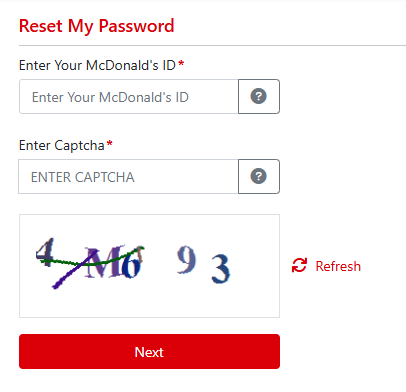
  1. Enter your McDonald's ID (your username - see ) and the Captcha:

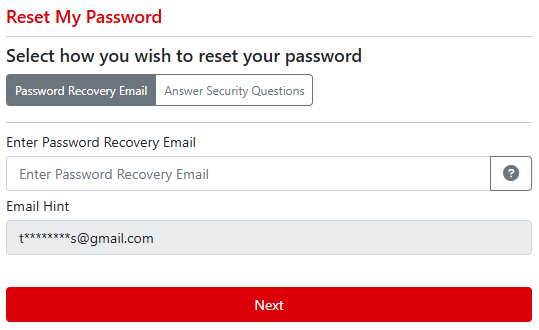
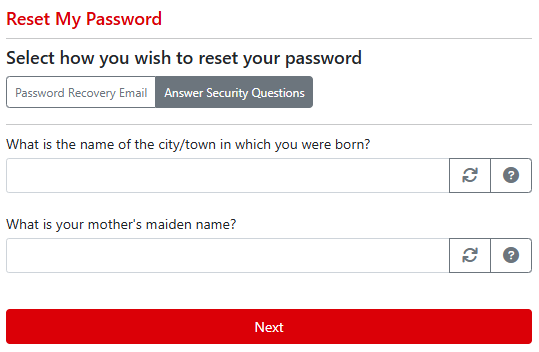
  2. We provide two different methods to validate your identity: recovery email and/or security questions. If you have only set up one of these methods in Global Account Manager, you will automatically be prompted for the method you have set up. If you have set up both methods, you will be able to choose which method to use:

    If using recovery email, type in the email address that you have configured as your recovery email. You will be sent an email with a code you will need to enter on the next step to validate your account.

    If using security questions, you will be prompted to answer two of your configured security questions:

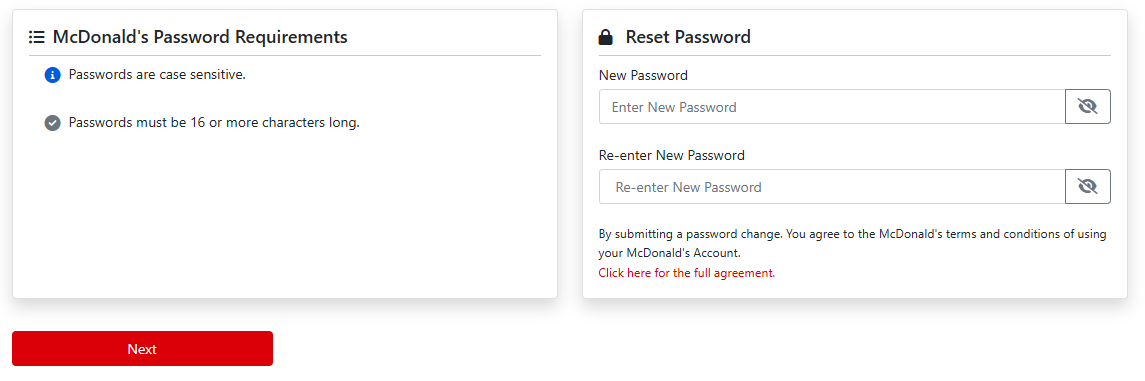
  3. Once your identity is validated, you will be prompted to reset your password. Once complete, please allow 5 minutes for your password to sync before attempting to log in again.

There are a couple names you may see for usernames today at McDonald's:

  • EID: An EID is a unique, unchanging value that is assigned to every user account in the format of eXXXXXXX. The username for most suppliers, franchisees, franchisee office staff, restaurant managers, and crew is the same as their EID.
  • ADID: In general, most corporate and market staff employees and contractors will have a username (typically called an ADID) that follows either an MC##### format or a cc-f.lastname (country code, first initial, last name) format.

Please note that all users have an EID value assigned to their account, even if their username is the ADID variety. This value is used by McDonald's applications to identify users and store preferences and other necessary information for the user and never changes.

McDonald's ID is a more general term that is meant to refer to your identity, regardless of which format your username takes. As we modernize the IAM platform, you will see a transition from the use of the term "McDonald's ID" to the new "archID" name.

archID username

archID username is the term that will be used moving forward to refer to your username and refers to the modern username format called a UPN that looks like an email address.

Everyone with a McDonald's workforce identity already has an archID username (UPN), but it is not always easy to know what it is! We're working on updates to the platform to make knowing your archID username much easier and expect to communicate these changes soon.

In the meantime, if you need to know your archID username, here are a few tips:

  • If you have a McDonald's email address/mailbox, your archID username is your McDonald's email address (example: john.doe@us.mcd.com).
  • If you do not have a McDonald's email address/mailbox, your archID username is typically going to be in the format of username@external.mcd.com where "username" is your existing username (see above). For example, if your existing username is e1234567, your archID username would be e1234567@external.mcd.com.
  • Crew users are in the format username@crew.mcd.com.

As we roll out the use of archID usernames, you'll start to see more consistent use of this terminology across McDonald's applications and communications. Additionally, you'll start to see the EID and ADID username formats referred to as "Legacy username" to make it easier to distinguish.

archID is the new, modern identity and access management platform currently being built to provide a seamless and secure login experience for all McDonald's digital workforce services. As we enable new, modern experiences you can expect improved security, easier access, and a more intuitive user interface.

If you need further assistance, please see our contact page for information on country-specific support channels.

Version 2025.11.06.03